One QA Trick That Cuts Test Flakiness Significantly — Skip the UI Navigation
Every QA engineer knows the feeling.
The test passed yesterday. It’s failing today. You check the app — nothing is broken. You check the code — nothing changed. You run it again. It passes. You run it a third time. It fails.
Flaky tests. The single most demoralising thing in test automation.
Most teams respond by adding waits, retries, or switching frameworks. Playwright instead of Selenium. Cypress instead of Playwright. Something new that will surely fix it.
It usually doesn’t. Because the flakiness was never the framework’s fault.
The real cause of most flaky tests
Before I explain the fix, look at this typical test flow for testing a report page:
- Navigate to login screen
- Enter username and password
- Click login button
- Wait for dashboard to load
- Find the navigation menu
- Click the menu item
- Wait for submenu to appear
- Click the submenu item
- Wait for report page to load
- Now actually test the report
Ten steps. And you haven’t even started testing yet.
Every one of those steps can fail for reasons that have nothing to do with the feature you’re testing:
- Slow network on step 3
- Animation not finished on step 5
- Menu tooltip blocking the click on step 6
- Different layout on mobile on step 7
- API timeout on step 9
Your test is supposed to be testing the report. Instead it’s testing the entire journey to reach the report — and failing somewhere along the way.
The fix — use the API to reach the page directly
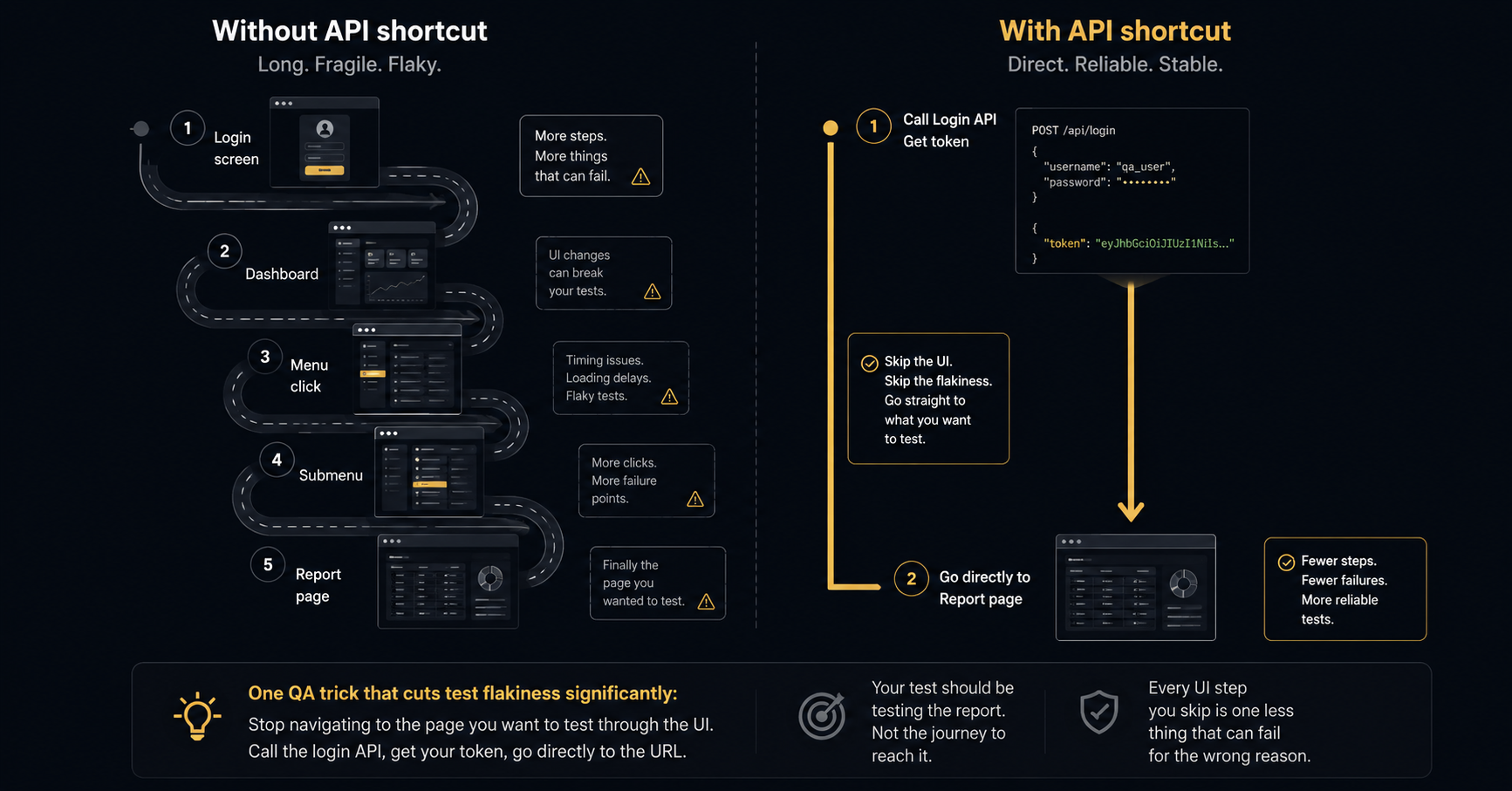
Instead of navigating through the UI to reach your test target, use the API:
- Call the login endpoint directly — get your auth token
- Set the session cookie or auth header in the browser
- Navigate directly to the page URL
Two steps. Clean. No flaky UI navigation in between.
Python example — before and after
The old way — navigating through UI:
from selenium import webdriver
from selenium.webdriver.common.by import By
from selenium.webdriver.support.ui import WebDriverWait
from selenium.webdriver.support import expected_conditions as EC

driver = webdriver.Chrome()
driver.get("https://yourapp.com/login")

# Step 1-3: Login through UI
driver.find_element(By.ID, "email").send_keys("qa@test.com")
driver.find_element(By.ID, "password").send_keys("password123")
driver.find_element(By.CSS_SELECTOR, "[data-testid='login-btn']").click()

# Step 4-5: Wait for dashboard
WebDriverWait(driver, 10).until(
    EC.presence_of_element_located((By.CSS_SELECTOR, "[data-testid='dashboard']"))
)

# Step 6-9: Navigate through menus to reach the report
driver.find_element(By.CSS_SELECTOR, "[data-testid='nav-menu']").click()
WebDriverWait(driver, 5).until(
    EC.element_to_be_clickable((By.CSS_SELECTOR, "[data-testid='reports-link']"))
).click()

# Finally on the report page — now we can actually test
The new way — API shortcut:
import requests
from selenium import webdriver

# Step 1: Get auth token via API — fast, reliable, no UI involved
response = requests.post("https://yourapp.com/api/login", json={
    "username": "qa@test.com",
    "password": "password123"
})
token = response.json()["token"]

# Step 2: Open browser and set the auth cookie/token
driver = webdriver.Chrome()
driver.get("https://yourapp.com")  # Open app to set cookie domain
driver.add_cookie({
    "name": "auth_token",
    "value": token,
    "domain": "yourapp.com"
})

# Step 3: Go directly to the page you actually want to test
driver.get("https://yourapp.com/reports/monthly")

# Now test the report — nothing else to worry about
Same end result. A fraction of the steps. Dramatically fewer failure points.
Why this works
The login flow is not what you are testing. The report is.
Every UI step you add between the test start and the feature under test is a potential failure point that has nothing to do with your assertion. Slow loading. Animation timing. Unexpected popups. Network delays. These are not bugs — they are noise. And noise makes tests unreliable.
The API call is deterministic. It either returns a token or it doesn’t. No timing issues. No element visibility problems. No layout changes to navigate around.
What about testing the login flow itself?
Test it separately. One dedicated test for the login page — checking the form, the validation, the error messages, the redirect on success.
That test should navigate through the UI because it is specifically testing the UI.
Every other test that needs to be in an authenticated state should use the API shortcut and skip straight to where it needs to be.
Works in Cypress too
Cypress has cy.request() built specifically for this:
// Cypress — API login shortcut
before(() => {
  cy.request('POST', '/api/login', {
    username: 'qa@test.com',
    password: 'password123'
  }).then((response) => {
    window.localStorage.setItem('token', response.body.token)
  })
})

it('should display monthly report correctly', () => {
  cy.visit('/reports/monthly')
  // Test the report directly — no UI navigation needed
})
Cypress’s own documentation recommends this approach. Not because UI tests are bad — but because testing the wrong thing through the UI is wasteful and fragile.
The mindset shift
The question to ask before writing any test:
“What am I actually testing here?”
If the answer is “the report” — get to the report the fastest, most reliable way possible. If the answer is “the login flow” — test the login flow properly with its own dedicated test.
One test. One responsibility. One reason to fail.
That principle alone — applied consistently across a test suite — will do more for flakiness than any framework switch ever will.
Extending the Pattern Beyond Login
The API shortcut approach isn’t only for authentication. Once you understand the pattern, you’ll see opportunities to apply it across your suite.
Test data setup. If your test requires a user to have already completed a specific action — placed an order, submitted a form, configured an integration — do it through the API rather than navigating the UI to complete those steps. Your test should start with the system in the right state, then test the feature you care about.
Resetting test state. After a test creates data (a new account, a new order), cleaning it up through the UI adds navigation steps that can fail for reasons unrelated to the test. A direct API call to delete the created record is cleaner, faster, and reliable.
Seeding complex scenarios. If you’re testing a feature that requires a user to be in a specific tier, have certain permissions, or have performed a minimum number of actions — set that state through the API before the test starts. Creating that state through the UI is fragile and slow; creating it through an API call is neither.
The broader principle: the setup and teardown of tests should be as deterministic as possible. Any UI navigation in setup is potential flakiness that has nothing to do with what you’re actually asserting.
What to Do With Your Existing Flaky Tests
If you have an existing test suite with significant flakiness, the API shortcut approach is a refactoring strategy, not just a philosophy.
Start by categorising your failing tests. For each flaky test, ask: what is the actual assertion? Then ask: how much of the test before the assertion involves navigating to a state rather than testing it?
In most suites, you’ll find a cluster of tests that spend 60-80% of their execution time navigating to the point where the test starts. These are the highest-priority candidates for refactoring. The assertion logic is often already correct — it’s the navigation that’s fragile.
Refactoring order: start with the tests that fail most frequently, not necessarily the tests for the most critical features. Your most flaky tests are creating the most noise in your CI pipeline and consuming the most investigation time. Fixing them first has the highest immediate ROI.
A good target: after refactoring the navigation out of your ten most flaky tests, measure your suite’s overall pass rate over a week. The improvement is usually significant enough to make the case for continuing the refactor across the full suite.
The Maintenance Advantage
One benefit of the API shortcut approach that doesn’t get discussed enough: it makes tests dramatically easier to maintain.
When a test navigates through four screens of UI to reach the feature under test, every UI change to those four screens is a potential test breakage. Menu restructuring, button renaming, layout changes, new modals added to the flow — any of these can break tests that were never testing those elements in the first place.
When the same test uses an API call to reach the feature, only changes to the API or the feature under test can break it. The number of things that can cause the test to fail shrinks dramatically, and the things that can cause it to fail are almost always things that should cause it to fail.
This is the definition of a test with good isolation. It fails when the thing it’s testing breaks. It doesn’t fail when unrelated things change.
Ready to improve your QA Testing?
Let's talk about how we can help.
Book Your Consultation
Shalini Gupta
4.8/5.0 Top RatedQA Lead & Founder · The Moms Desk
ISTQB-certified QA lead with 15+ years across SaaS, fintech, health tech, and crypto. She has delivered 200+ projects for clients in the US, UK, and Australia — and built The Moms Desk to bring senior-level QA and product expertise to startups without the agency price tag.