Self-Healing Test Automation: What It Actually Means and How It Works in Practice
If you’ve been in QA or automation for more than six months, you’ve seen this happen.
A test that passed yesterday is failing today. You check the error. The element isn’t found. You check the app. The button is still there. It works fine in the browser. Nothing is visually broken.
Then you dig deeper and find it: a developer renamed a CSS class. Changed an ID. Moved a div. Something small that took them thirty seconds — and broke three of your tests.
This is the most common reason automation suites fall apart. Not because the tests are wrong. Because the UI changes faster than the tests can keep up.
Self-healing automation is designed to fix exactly this problem. But before we get there — there’s a simpler, preventive step that every QA engineer should push for first.
The right first step: ask for data-testid
Before self-healing even enters the picture, the correct engineering practice is to ask your developers to add data-testid attributes to every interactive element in the UI.
<!-- Instead of relying on CSS class or ID -->
<a class="bg-ink text-cream rounded-pill">Book a Free Call</a>

<!-- Ask the developer to add this -->
<a class="bg-ink text-cream rounded-pill" data-testid="book-free-call-btn">Book a Free Call</a>
Your test then targets data-testid instead of a class or ID:
# Fragile — breaks when developer renames the class
driver.find_element(By.CSS_SELECTOR, "a.bg-ink.text-cream.rounded-pill")

# Stable — survives any styling or class rename
driver.find_element(By.CSS_SELECTOR, "[data-testid='book-free-call-btn']")
When the developer renames bg-ink to bg-primary, your test doesn’t care. The data-testid attribute stays exactly as it was — because it has nothing to do with styling. It’s there purely for testing.
Why developers should agree to this:
- It costs them two seconds per element
- It makes their own debugging faster too
- It doesn’t affect visual styling or behaviour
- It’s a widely accepted industry standard (React, Vue, Angular teams all use it)
How to raise it professionally:
“Can we add
data-testidattributes to interactive elements as part of our definition of done? It prevents test maintenance overhead every time we refactor styles — which saves both QA and dev time.”
Most developers agree immediately once they understand the tradeoff.
When data-testid isn’t possible:
- Legacy codebases you can’t modify
- Third-party components or embedded widgets
- Teams that move too fast to add attributes consistently
- Existing test suites on code you don’t own
This is exactly where self-healing automation earns its place — as a safety net for the cases where stable locators aren’t available.
What self-healing actually means
A regular Selenium test finds elements using locators — things like:
driver.findElement(By.id("book-call-btn"));
driver.findElement(By.cssSelector(".nav-cta-button"));
driver.findElement(By.xpath("//a[contains(text(),'Book a Free Call')]"));
When that locator stops matching — because the ID changed, the class was renamed, or the element moved — the test throws a NoSuchElementException and fails. Full stop.
Self-healing changes this behaviour. Instead of failing immediately, the framework:
- Tries the original locator — fails
- Falls back to alternative locators it stored when it first learned the element
- Tries text content, position on page, nearby elements, visual appearance
- If it finds the element through a fallback — it heals the locator automatically and updates it for future runs
- Logs what it changed so you can review it
The test passes. Your pipeline doesn’t break. And next time, it uses the updated locator.
Why this matters more than most people realise
In a fast-moving startup, UI changes happen constantly. Developers refactor components, rename classes, restructure layouts. Every change is a potential test break.
Without self-healing, you spend 30–40% of your automation time on maintenance — just keeping tests green after UI changes that didn’t actually break anything for users.
With self-healing, that maintenance burden drops significantly. The framework adapts. You focus on writing new tests and finding real bugs.
The practical example — live on themomsdesk.com
I’m going to demonstrate this using my own site: themomsdesk.com. I built it, so I know exactly what’s in the HTML.
We’ll write a Selenium test that clicks the “Book a Free Call” button in the navbar. Then we’ll simulate what a developer might do — rename the button’s CSS class — and watch what happens with and without Healenium.
Step 1 — Install dependencies
pip install selenium webdriver-managerStep 2 — Write the test
from selenium import webdriver
from selenium.webdriver.common.by import By
from selenium.webdriver.chrome.service import Service
from selenium.common.exceptions import NoSuchElementException
from webdriver_manager.chrome import ChromeDriverManager

def find_with_healing(driver, primary_locator, fallbacks, element_name):
    """
    Tries the primary locator first.
    If it fails, works through each fallback in order — mimicking
    what a self-healing framework like Healenium does internally.
    """
    try:
        el = driver.find_element(*primary_locator)
        print(f"✅ Primary locator worked: {primary_locator[1]}")
        return el
    except NoSuchElementException:
        print(f"❌ Primary locator FAILED: {primary_locator[1]}")
        print("⚠️  Self-healing activated — trying fallback strategies...")

    for i, (strategy, value) in enumerate(fallbacks, 1):
        try:
            el = driver.find_element(strategy, value)
            print(f"✅ Fallback {i} worked: [{strategy}] '{value}'")
            print(f"⚠️  Healing applied → locator updated to this fallback")
            return el
        except NoSuchElementException:
            print(f"❌ Fallback {i} failed: [{strategy}] '{value}'")

    raise NoSuchElementException(f"All strategies exhausted for '{element_name}'")


# Browser setup
options = webdriver.ChromeOptions()
options.add_argument("--start-maximized")
driver = webdriver.Chrome(
    service=Service(ChromeDriverManager().install()),
    options=options
)

driver.get("https://themomsdesk.com")

# Primary locator — the original CSS class on the button
primary = (By.CSS_SELECTOR, "a.bg-ink.text-cream.rounded-pill")

# Fallback strategies — tried in order if primary fails
fallbacks = [
    (By.LINK_TEXT,         "Book a Free Call"),
    (By.PARTIAL_LINK_TEXT, "Free Call"),
    (By.XPATH,             "//a[contains(text(),'Book a Free Call')]"),
    (By.XPATH,             "//nav//a[contains(@class,'rounded-pill')]"),
]

el = find_with_healing(driver, primary, fallbacks, "Book a Free Call")
print(f"Button text: {el.text}")
el.click()

driver.quit()
Step 3 — Run the test (it passes ✅)
The button is found by its CSS selector. Test passes, result logged.
Step 4 — Simulate the developer change
A developer refactors the navbar and renames the button class from bg-ink to bg-primary. This takes them 10 seconds.
In Navbar.astro, the button now looks like:
<!-- Before -->
<a class="bg-ink text-cream px-4 py-2 rounded-pill ...">Book a Free Call</a>

<!-- After developer refactor -->
<a class="bg-primary text-cream px-4 py-2 rounded-pill ...">Book a Free Call</a>
Step 5 — Run the test again
Without self-healing: NoSuchElementException — test fails. CI pipeline turns red.
With self-healing fallbacks:
- Primary locator fails ❌ (
a.bg-ink.text-cream.rounded-pillno longer exists) - Fallback 1 tries
By.LINK_TEXT "Book a Free Call"✅ — found - Button clicked successfully
- Logs: “Healing applied → locator updated to this fallback”
Test passes. Developer ships. QA doesn’t have to fix anything.
🎥 Video walkthrough
The video below shows the full sequence live on themomsdesk.com — test passing with the original class, the class being renamed to simulate a developer change, the test failing without self-healing, and finally the self-healing fallback finding the button and passing.
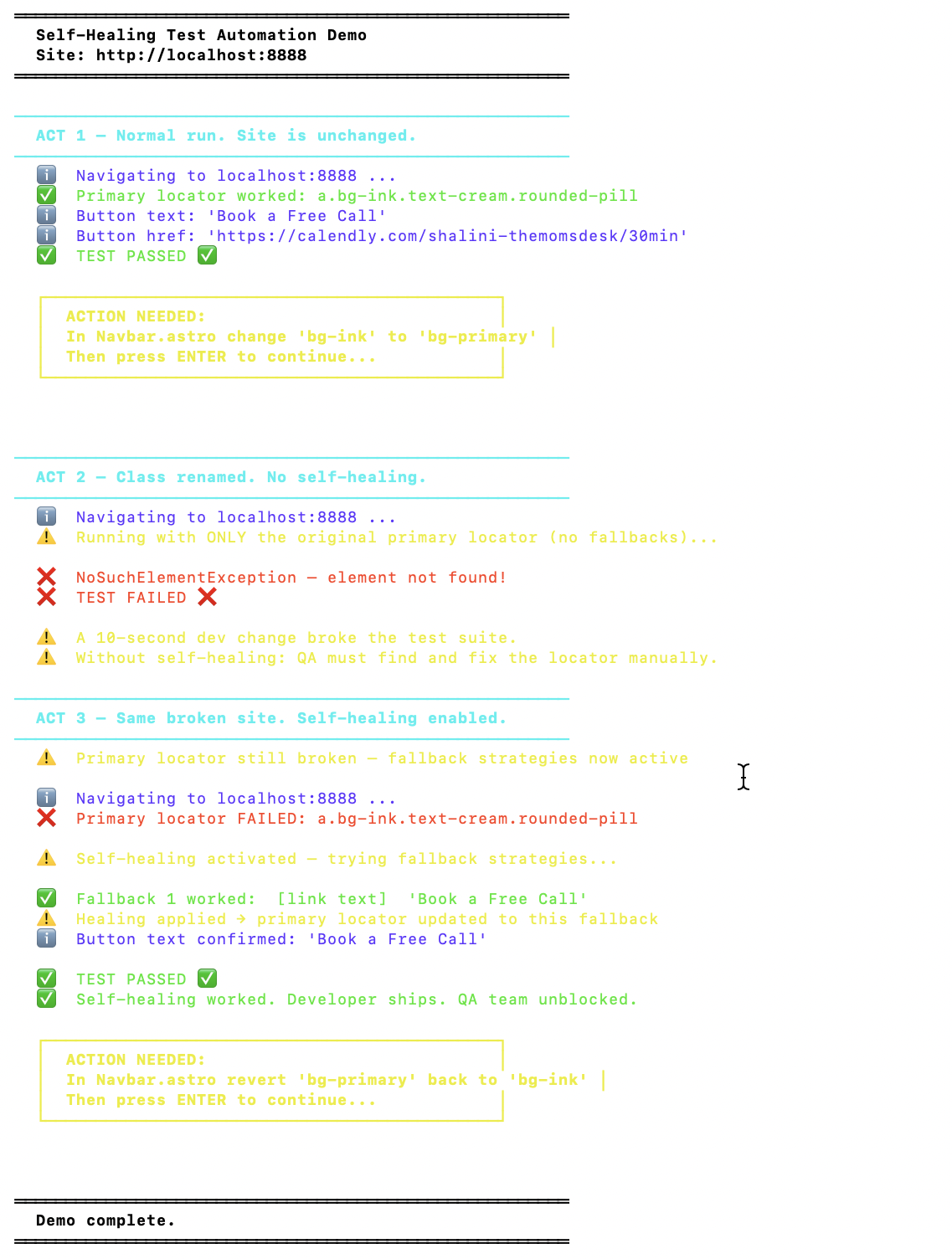
Terminal output from the demo — ACT 1 passes with the primary locator, ACT 2 fails after the class rename, ACT 3 self-heals using the link text fallback and passes.
Honest limitations — when self-healing won’t save you
Self-healing is not a replacement for good test design. Here’s when it fails:
1. Completely new UI flows — If a whole page is rebuilt, there’s nothing to heal. The element is genuinely gone.
2. Dynamic content — If elements are generated at runtime with random IDs, self-healing has nothing stable to anchor to.
3. Silent failures — If the element heals but the behaviour changed (button now opens a modal instead of navigating), the test passes but the assertion is wrong. Self-healing fixes locators, not logic.
4. Over-reliance — Teams that rely on self-healing to avoid writing stable locators end up with a pile of healed-but-fragile tests. Use it as a safety net, not a strategy.
Tools worth knowing
| Tool | Free tier | Self-healing approach | Best for |
|---|---|---|---|
| Healenium | ✅ Open source | AI locator fallback | Selenium/Java teams |
| Testim | Limited | ML element recognition | No-code + dev teams |
| Mabl | Trial only | Visual + DOM matching | Non-technical QA |
| Katalon | Free tier | Smart locator engine | Teams wanting all-in-one |
| Applitools | Free tier | Visual AI | Cross-browser visual testing |
My honest take: For most startup teams, Healenium is the right starting point. It’s free, open source, and drops into your existing Selenium setup without rewriting tests. The paid tools are excellent but hard to justify until you have a larger suite.
The bottom line
Self-healing won’t fix bad tests. It won’t replace a proper QA strategy. But it will stop your pipeline from breaking every time a developer touches the frontend — which, in a fast-moving startup, happens constantly.
If you’re running Selenium and spending more than a few hours a week on locator maintenance, Healenium is worth an afternoon to set up.
If you’re running Selenium and spending time on locator maintenance — or want a QA specialist to review your test suite — we can help.
Ready to improve your QA Testing?
Let's talk about how we can help.
Book Your Consultation
Shalini Gupta
4.8/5.0 Top RatedQA Lead & Founder · The Moms Desk
ISTQB-certified QA lead with 15+ years across SaaS, fintech, health tech, and crypto. She has delivered 200+ projects for clients in the US, UK, and Australia — and built The Moms Desk to bring senior-level QA and product expertise to startups without the agency price tag.